
This documentation puts forward detailed technical instructions for all EFD vendors. Make sure you read them carefully if you plan to develop an invoicing system (POS) or an E-SDC solution.
Only solutions that are fully compliant with these instructions will be officially accredited by the accreditation authority.
Components of Electronic Fiscal Device
Electronic Fiscal Device (EFD) is composed of an Invoicing System (POS), an SDC and a Secure Element, all connected into one system. EFD produces fiscal receipts and reports Audit Data to a tax authority. There are different options for a taxpayer’s EFD setup. Every taxpayer can decide which EFD setup best suits his/her business needs.
Each EFD consists of three logically separated components.
POS, SDC and Secure Element must communicate using protocols published as part of this documentation. Protocols are public and subject to change. Please familiarize yourself with Versioning and End of Life policies.
POS or Invoicing System
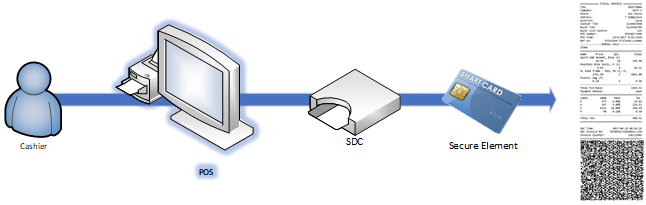
Invoicing System or POS means a point-of-sale invoicing device or software which is used by a business for:
- Management control in the areas of sales analysis and stock control
- Entering the transaction data for each transaction made by the business
- Submitting the transaction data to an SDC service
- Issuing fiscal invoices to customers after receiving the fiscalized data back from the SDC Invoicing System or POS are provided by 3rd Party Vendors and are subject to accreditation.
SDC
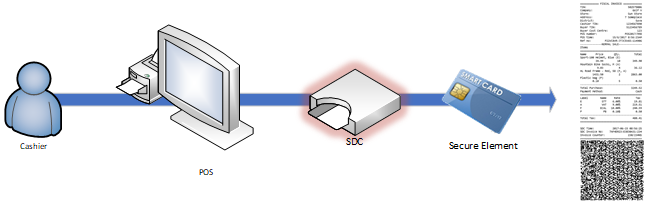
Sales Data Controller (SDC) is the hardware or software component of an EFD that
- Receives transaction data from a POS component of the EFD;
- Analyses the transaction data into fiscal data; Formats the fiscal data as a fiscal invoice, creates the digital signature for the EFD and records the digital signature on the fiscal invoice;
- Transmits the fiscal invoice to the POS;
- Preserves the transaction data and fiscal data in an irrevocable and secure manner; and
- Transmits the fiscal data to the Authority’s system;
- Communicates with Secure Element, TaxCore.API and POS to configure itself, fiscalize invoice and transmit audit data
V-SDC
Virtual Sales Data Controller is a web service operated by the tax authority that enables authorized taxpayers to use SDC functionality via the Internet. V-SDC is limited to Connected Scenarios which means that any invoicing system that targets V-SDC must have a reliable internet connection at the moment of sale. Check V-SDC for more details.
E-SDC
External SDC (E-SDC) is a ‘black box’ type of software or hardware that communicates with a smart card secure element and enables semi-connected fiscalization scenarios (enables issuing fiscal invoice when the internet is down). It resides at taxpayers’ business locations and communicates with a Secure Element which is issued to taxpayers on a smart card (every smart card has its own secure element and a taxpayer can have more than one smart card for issuing fiscal invoices). In other words, E-SDC uses the taxpayer’s secure element to place a digital signature on the fiscal invoice. E-SDC are provided by 3rd Party vendors and are subject to accreditation.
Dev E-SDC
Development ESDC is a software version of an E-SDC used by POS developers. It is built according to the latest technical specification for E-SDC devices and is used to develop, test and accredit invoicing solutions.
Development ESDC is available to all registered vendors via the Developer Portal. It simulates the operation of an ESDC on a local network in the production environment, so vendors can upgrade their applications or devices without obtaining any physical E-SDC device or smart card. Development ESDC is also used during the accreditation process to check whether an invoicing system is functional.
Secure Element
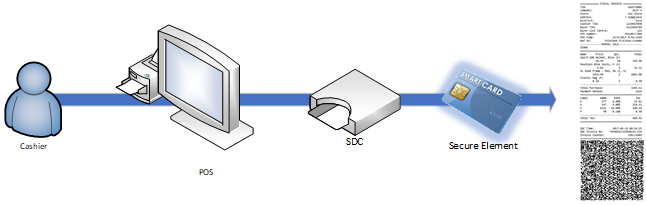
Secure Element (SE) means the software and hardware used by an EFD and the Authority to prevent tampering and unauthorized use of fiscal data transmitted to the Authority’s system and to maintain the integrity of the fiscal data.
Secure Elements are provided to Taxpayers by Fiji Revenue And Customs Services. Authorized persons of Taxpayers may request additional secure elements via Taxpayer Admin Portal.
It may be implemented in various fomrats. Most common implemntations are SmartCards and PKCS12 files.
Building POS and E-SDC as one device or application
These are the accreditation conditions you need to be aware of if you are planning to develop an all-in-one POS + E-SDC solution:
The solution must pass all the tests with the SDC Analyzer Win App during the accreditation process. It means that endpoints documented in POS to SDC protocol related to E-SDC must be accessible to external callers during accreditation.
Once accreditation is completed, the POS to SDC protocol may be omitted from final documentation and made inaccessible to external callers.
What can you find in this documentation?
The documentation consists of a Getting Started With Accreditation article describing basic facts and steps related to accrediting a POS or E-SDC solution. There is also General Information section, common for all EFD vendors. Finally, there are two separate sections with specific information for POS and E-SDC developers. Please see below for lists of documentation sections according to vendor type.
Sections for POS vendors
Sections for E-SDC vendors
Last Updated - April 14, 2026